UI/UX Design Services: What to Expect and How to Prepare
First time hiring a UI/UX design team? Here's what the process looks like, and what not to waste.
G
Georgiana Nutas
·8 min read
Most founders who hire UI/UX design services for the first time walk in underprepared and walk out disappointed, not because the agency failed, but because no one explained what the process actually looks like. This guide fixes that. Whether you're building a new product from scratch or finally redesigning a site that's quietly killing your conversion rate, here's what to expect at every phase, what to prepare before day one, and how to avoid the mistakes that slow projects down.
What UI/UX Design Services Actually Include
The term gets used loosely. Some agencies mean a logo refresh. Others mean a full research-to-implementation pipeline. The gap between those two things can cost you tens of thousands of euros and a quarter of your year.
Here's the actual split:
UX (User Experience) design is about how the product works. Structure, flow, and making sure users reach their goals without hitting walls.
UI (User Interface) design is about how the product looks. Visual hierarchy, typography, color, spacing, and the small interaction details that make a product feel polished or cheap.
You need both. A beautiful interface with broken navigation frustrates users. A well-structured product with poor visuals erodes trust before a user even reads a word. The best UI/UX design services deliver both, and they don't treat them as separate workstreams.
If you're evaluating whether to hire a UX designer, a full-service UI design agency, or a team that covers both design and development under one roof, the answer usually depends on the complexity of your product and how much internal capacity you already have. More on that below.
The UX Design Process: 5 Phases Explained
Every agency structures this slightly differently. But if they're doing it properly, you'll see a version of these five phases.
Phase 1: Discovery and Research (Week 1–2)
This is where the design team earns or wastes the next four weeks. Skip this phase, and you're designing based on assumptions. Do it properly, and every decision that follows has a reason behind it.
What happens:
Stakeholder interviews to understand your business objectives and what "success" means for this project
Competitive analysis to identify visual patterns, gaps, and opportunities in your market
Tagged:#uidesign #uxdesign #webdesignagency
G
Written by
Georgiana Nutas
Building modern web applications at BluDeskSoft. We write about what we learn along the way.
User research — interviews, surveys, or analytics review — to understand how real people actually behave (not how you assume they behave)
Content audit if you're redesigning an existing site
What you should prepare before kickoff:
Access to your analytics (Google Analytics, Search Console, heatmap tools like Hotjar or Microsoft Clarity)
Your top 3–5 business goals for the project, written down and specific
Existing brand guidelines — logo files, colors, fonts — if they exist
3–5 competitor or reference sites you admire, and a short note on why
The more you bring to this phase, the less time is spent on alignment later.
Phase 2: Information Architecture and Wireframes (Week 2–4)
Before anything looks like your brand, the design team needs to figure out what goes where and why.
What happens:
Sitemap showing the full page hierarchy
User flow diagrams mapping the key journeys: signup, purchase, onboarding, contact
Low-fidelity wireframes showing layout, content placement, and structure
Content strategy recommendations
The thing most clients get wrong here:
Wireframes look intentionally rough. They're grayscale, blocky, and stripped of any visual polish, on purpose. The goal is to align on the structure before anyone argues about button colors.
Your job at this stage is to review wireframes for logic, not aesthetics. Ask: Does the user journey make sense? Is the most important information easy to find? Are the calls to action in the right places? Save the aesthetic feedback for Phase 3.
Phase 3: Visual Design (Week 3–6)
This is where the product starts to look like a real product.
What happens:
A full design system: colors, typography, spacing, and a component library that developers can actually build from
High-fidelity mockups of key pages — homepage, core landing pages, forms
Responsive web design showing desktop, tablet, and mobile breakpoints
Most agencies present 1–2 design directions at the start of this phase. You choose a direction, then go through 2–3 revision rounds before locking the visual approach.
One rule that saves every project: Designate one person with approval authority. Not a committee. Not "whoever is loudest in the Slack thread." One person reviews, consolidates feedback, and gives the final call. Design by committee produces the visual equivalent of a camel designed to be a horse.
What makes strong feedback at this stage:
❌ "I don't like it."
✅ "The homepage hero doesn't communicate urgency, and the CTA gets buried below the fold on mobile."
The first is a reaction. The second is a problem the design team can solve.
Phase 4: Prototyping and Usability Testing (Week 5–7)
This is the most skipped phase. It's also the one that saves the most money.
What happens:
Interactive prototypes built in Figma (or similar tools) that simulate real user flows
Usability testing with 5–8 representative users
Task-based testing: can users complete your key actions without getting stuck or guessing?
A findings report with prioritized recommendations
The math that makes this obvious:
Fixing a navigation problem in Figma takes one hour. Fixing the same problem after development takes 1–3 days of developer time, plus QA time, plus redeployment. For complex products, that multiplier is even higher.
According to the Nielsen Norman Group, testing with just 5 users surfaces roughly 85% of major usability problems. You don't need a massive research operation. You need real people using the product.
Your role: Help recruit test participants who actually represent your users, not your coworkers, not your investors, not your spouse.
Phase 5: Design Handoff (3–5 Days)
The final phase bridges design and development. How well this is done determines how closely the built product matches the approved designs.
What a proper handoff includes:
Complete design specifications: exact spacing, sizes, colors as hex/HSL values
Asset exports: icons, images, illustrations in the right formats and resolutions
Component documentation for the development team
Responsive breakpoint specifications
Annotations on interactive behaviors, transitions, and edge cases
If your agency handles both design and custom web application development, the handoff is seamless; the same team that designed it builds it, so nothing gets lost in translation. If you're handing off to a separate development team, this documentation is what stands between your approved design and something that looks "almost like it."
How to Work With a UI/UX Design Agency
Give real content, not placeholders
Lorem ipsum hides problems. Real headlines, real product descriptions, and real images let designers create layouts that actually work for your content. If the final copy isn't ready, provide drafts that are close, even 80% there; it's better than a placeholder.
Set a specific goal, not a vibe
"We want a modern-looking website" is not a brief. "We want to increase trial signups by 30% within 90 days of launch" is. Specific goals give the design team measurable targets to design toward. Vague goals produce vague results.
Trust the process you're paying for
If you hired a team for their UI/UX design services, let them run the process they've built. Skipping user research to "save time" costs more time later. Jumping straight to visual design without wireframes leads to expensive structural changes mid-development. The phases exist because they prevent the problems that kill projects.
What UI/UX Design Services Cost
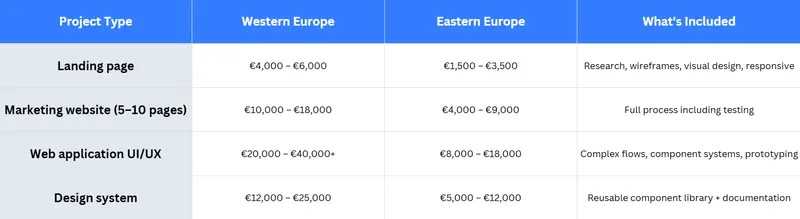
Pricing varies based on scope, complexity, and the agency's experience level. Whether you're hiring a freelance UX designer or a full-service web design agency, the cost ranges below reflect what you can expect at each level of engagement.
These ranges reflect mid-tier agency pricing. Enterprise agencies charge more. Freelancers charge less but typically cover fewer phases, which means you end up filling the gaps.
The cost of skipping design is harder to quantify upfront. It shows up as lower conversion rates, expensive development rework, and users who abandon key flows without ever telling you why. According to Forrester Research, every dollar invested in UX returns between $2 and $100. The direction is consistent even when the number varies.
When the Investment Makes Sense
You don't need a full design engagement for every project. Here's a simple framework:
Invest in UI/UX design services when:
You're building a new product or completely overhauling an existing one
Conversion rates are consistently below your industry benchmark
User feedback — in support tickets, reviews, or interviews — keeps mentioning confusion or friction
You're entering a competitive market where first impressions make or break trust
The product involves complex workflows: dashboards, multi-step onboarding, forms with logic
You can skip when:
Making minor content updates to a stable, well-performing site
Building an internal tool where speed matters more than polish
Working within a mature design system that only needs implementation
How to Choose a UI/UX Design Agency
Before signing anything, ask these questions:
Do they include user research? If the answer is "we already know what users want," walk away.
Can they show before-and-after metrics? Good designers track the impact of their decisions. If they can't show you what changed after their work, that's a signal.
Do they prototype and test? For any product with real complexity, prototyping before development is non-negotiable.
Will the same team design and build? If yes, you eliminate the handoff gap entirely. A UI design agency that also handles development is a material advantage in terms of timeline and quality.
Do they design for mobile from the start? Responsive web design isn't a finishing step; it's a constraint that should shape every layout decision from day one.
Do they have experience with your type of product? A team that's built SaaS dashboards thinks differently from one that mostly does marketing sites. Match the agency's portfolio to your project type.
Ready to Start?
If you're preparing for a design project and want clarity on scope, timeline, and budget before committing to anything, book a free consultation with the BluDeskSoft team. We'll review your current site, discuss your goals, and give you an honest recommendation, whether that's a full UI/UX design engagement or something leaner.
No pitch deck. No obligation. Just a clear-eyed look at what your product actually needs.
Find 15 UX friction points that quietly cost your website conversions.
 BluDeskSoft
-1-800x450.webp)