Your website launched. It looks sharp, loads fast, and ranks on page one. So you move on.
Six months later: a plugin vulnerability lets an attacker inject spam links across your pages. A new batch of uncompressed images has killed your load time. Your SSL certificate expired on a Friday evening. Organic traffic is down 30%, and nobody noticed until the quarterly review.
This is what "set it and forget it" actually costs. And it's exactly the situation that led us to build BluDeskSoft in the first place. We kept inheriting broken websites, abandoned projects, and codebases nobody had touched since launch day.
This website maintenance services checklist covers exactly what ongoing care looks like, organized by category, frequency, and priority, so nothing slips through the cracks after you go live.
Why Most Sites Fail Quietly (Not Suddenly)
We see this pattern constantly. A business launches, the agency wraps up and moves on, and the site slowly degrades, a plugin goes unpatched for three months, page speed creeps up by half a second, a broken internal link starts bleeding crawl equity, and a contact form quietly stops delivering leads.
By the time someone notices, the damage is already done.
One of our WordPress clients came to us with an 8-second load time and stagnant conversions. Three weeks into a maintenance and optimization engagement, load time was down to 1.8 seconds. Conversions jumped 35% that same month, not from new traffic, just from fixing what had been quietly broken for months.
A structured website maintenance plan changes that dynamic. Instead of reacting to problems, you prevent them. Instead of emergency fixes at premium rates, you handle routine updates on a schedule.
Here's what that looks like in practice.
1. Security Maintenance
Security is the non-negotiable baseline. A compromised site can destroy your search rankings overnight, expose customer data, and cost far more to recover from than any maintenance retainer ever would.
According to Sucuri's annual website threat research report, over 50% of compromised websites were running outdated CMS software at the time of the breach. The fix in most cases? A routine update that nobody applied.
Weekly
- Apply CMS and plugin/dependency security patches
- Review login activity and failed authentication attempts
- Check file integrity for unauthorized modifications
Monthly
- Run a full malware and vulnerability scan
- Review and update user access permissions
- Verify SSL certificate status and expiration date
- Test contact forms and payment flows for injection vulnerabilities
Quarterly
- Audit third-party integrations and API keys
- Review and harden security headers (CSP, HSTS, X-Frame-Options)
- Run through your incident response plan, don't wait for a real breach to test it
Quick rule: If you haven't applied a security update in the last 7 days, you're already behind.
2. Performance Maintenance
Site speed affects bounce rate, conversion rate, search rankings, and the fundamental experience of using your product. And performance degrades quietly over time as content grows and dependencies change.
Google's Core Web Vitals are now a direct ranking factor. If you're not tracking them, you're flying blind.
Weekly
- Monitor Core Web Vitals (LCP, CLS, INP) via Google Search Console
- Check server response times and uptime logs
Monthly
- Compress and convert new images (WebP/AVIF with proper dimensions)
- Audit page weight across your 10 most-visited pages
- Clean up unused CSS, JavaScript, and orphaned media files
- Test load times on mobile under 3G throttling, that's your real benchmark
Quarterly
- Run a full Lighthouse audit across all key pages
- Review CDN configuration and caching rules
- Evaluate hosting performance against your current traffic load
- Load test before a major launch or campaign, not after
Benchmarks to track
-1.png&w=3840&q=75)
If your custom web application or marketing site isn't hitting these numbers, performance maintenance is where you start.
3. Backup and Recovery
Backups are worthless if you've never tested a restore. That's not a knock; it's the most common mistake we see. A backup that's never been tested isn't a safety net; it's a false sense of security.
Weekly
- Verify automated backups completed without errors
- Confirm backups are stored in at least two separate locations (on-site + off-site)
Monthly
- Do a full test restore in a staging environment, not just "check that the file exists"
- Verify database backups include all tables and recent transaction data
Quarterly
- Review your backup retention policy (how far back can you actually restore?)
- Time for a disaster recovery drill: simulate a complete failure and measure how long recovery takes
What good looks like
- Daily automated backups with 30-day retention minimum
- Off-site storage, never on the same server as your live site
- Restore time under 1 hour
- Tested restore at least once per quarter, with documentation
If you can't answer "how long would it take to restore our site from yesterday's backup?" in under 10 seconds, that's your answer.
4. Content and SEO Maintenance
Search rankings aren't permanent. Competitors publish new content. Algorithms change. Pages that ranked well in January can slide by April, especially if they haven't been touched since launch.
Weekly
- Check Google Search Console for crawl errors, indexing issues, and manual actions
- Monitor keyword ranking movement for your primary target terms
Monthly
- Fix broken links, both internal and external
- Update outdated content: old statistics, changed pricing, deprecated product details
- Identify underperforming pages (deep impressions, low CTR) and improve title tags and meta descriptions
- Submit updated sitemaps if the site structure has changed
Quarterly
- Full content audit: what's ranking, what's declining, what's completely missing?
- Review and update schema markup (FAQ, Article, Product, HowTo)
- Analyze competitor content gaps and build a new content plan around them
- Review internal linking structure, every new page you publish should link to and from existing content
Good UI/UX design gets visitors to your site. Content and SEO maintenance keep them coming back, and keep Google sending more.
5. CMS and Software Updates
Every piece of software your site depends on needs regular updates. Skipping them isn't neutral; it's a slow accumulation of risk.
For WordPress sites
- Update WordPress core within 1 week of stable release
- Update plugins and themes within 1 week, always test on staging first
- Remove unused plugins and themes: they're an attack surface you're not even using
- Verify the PHP version is current and fully supported
Running WordPress development at scale? Automate update testing in a staging pipeline before anything touches production. We do this for every WordPress client we maintain; it's what prevented one client from having a staging update silently wipe out their checkout flow mid-campaign.
For custom applications (Next.js, React, Node.js)
- Update frameworks and dependencies monthly, checking for breaking changes before committing
- Run your automated test suite after every dependency update
- Monitor for known vulnerabilities with
npm audit or Snyk - Keep Node.js and runtime versions current; end-of-life runtimes stop receiving security patches
A note from our own stack: We migrated bludesksoft.com from WordPress to Next.js + Supabase. Load times dropped over 80%. If you're maintaining a growing custom application, keeping your runtime, dependencies, and infrastructure current isn't optional, it's what prevents that performance baseline from eroding back to where you started.
For all sites
- Track end-of-life announcements for critical dependencies
- Plan major version upgrades 2–3 months before they become urgent; rushed migrations break things
6. Uptime and Error Monitoring
If your site goes down at 2 AM, you should know before your customers do.
Continuous monitoring
- Uptime monitoring with SMS/email alerts (Pingdom, UptimeRobot, or Better Uptime)
- Error tracking in production, we use Sentry on every project we maintain
- Server resource monitoring: CPU, memory, disk, especially around high-traffic periods
Monthly
- Review error logs and resolve recurring issues, not just the loudest ones
- Confirm alert notifications are actually reaching the right people (test your alerting)
- Review your uptime percentage against your SLA target
Target: 99.9% uptime
That's roughly 8 hours and 45 minutes of downtime per year. If you're averaging below 99.5%, something is structurally wrong, and it's worth investigating before a campaign or product launch exposes it.
What Every Site Needs vs. What Yours Might Need
Not every site needs every item above. Here's a practical triage:
Every site, no exceptions
- Security updates and patching
- Automated backups with tested restores
- Uptime monitoring
- SSL certificate management
Most business sites also need
- Performance monitoring and optimization
- Content and SEO maintenance
- CMS and dependency updates
- Broken link checking
High-traffic or e-commerce sites should add
- Load testing before campaigns
- Advanced error tracking and alerting
- Real-user monitoring (RUM)
- CDN and caching optimization
- PCI compliance checks (if you're processing payments)
DIY vs. Professional Website Maintenance Services
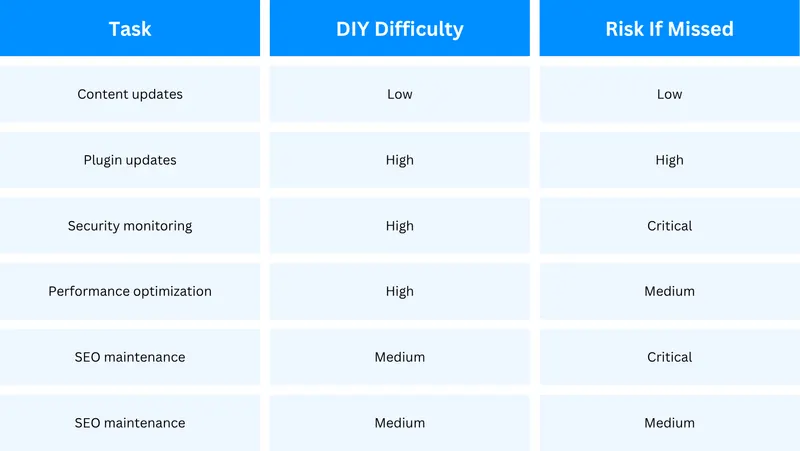
You can handle some of this in-house. The question is whether you should, and what slips through when your team is stretched thin.

Content updates and basic CMS patches can be managed in-house. Security monitoring, performance tuning, and backup testing? Most teams don't have the bandwidth to do those consistently, and inconsistency is exactly where the risk lives.
What to Expect From a Maintenance Partner
Most agencies disappear after launch. That's not a criticism; it's a structural problem with how project-based work is scoped. Maintenance doesn't fit neatly into a fixed-scope contract, so it gets deprioritized or handed off to someone junior.
Here's what a partner who actually stays involved should deliver:
- Defined response times — We guarantee a response time of under 1 business day for issues. "As soon as possible" is not a response time.
- Monthly reporting — A clear summary of what was done, what was found, and what's coming next. You should never have to ask what's happening with your site.
- Proactive patching — Security updates and dependency upgrades applied on a schedule, not after something breaks.
- Staging environment testing — Nothing goes to production untested. This is non-negotiable.
- Direct access — No ticket queues, no account managers relaying messages. You talk to the people doing the work.
If your current provider can't confirm all five of those, it's worth asking why.
Start Here
If you don't have a website maintenance plan in place yet, don't try to implement this entire checklist at once. Start with two things:
- Security patching — apply any pending updates today
- Backup verification — confirm your last backup completed, then do a test restore
Everything else builds from there.
If you want a maintenance plan tailored to your actual site, not a generic package, book a free strategy call. We'll audit your current setup and tell you exactly what needs attention and what can wait. No pitch, just an honest look at where you stand.
BluDeskSoft builds and maintains web applications for startups and growing businesses. See our work or get in touch.