How Much Does a Custom Web Application Cost in 2026?
Learn what affects custom web application cost in 2026 and how to budget smarter before you build.
G
Georgiana Nutas
·12 min read
How Much Does a Custom Web Application Cost in 2026?
If you are researching the cost of a custom web application in 2026, you already know a Google search will not give you a straight answer. You want to know whether your idea costs €5,000, €50,000, or €200,000, and why the gap is so large.
Here is the honest version, in two parts.
First, what the market charges, because that is what most guides quote.
Second, what we actually charge, because we sit well below it, and the gap is the whole point of this article.
A custom web application is software, not a template. The price tracks what you are really building: scope, user roles, integrations, security, design complexity, and how maintainable it needs to be six months after launch.
So the better question is not:
“What is the cheapest way to build this?”
It is:
“What is the smallest reliable version we can ship to validate the idea, without rebuilding it in six months?”
That is where smart budgeting starts.
What Is a Custom Web Application?
A custom web application is interactive software that runs in a browser and is built around a specific business need.
Unlike a marketing website, which mostly presents information, a web application lets users do something.
They create accounts. Manage data. Book services. Track orders. Access dashboards. Submit requests. Automate workflows.
Common examples include:
SaaS dashboards;
CRM systems;
booking platforms;
client portals;
internal tools;
marketplaces;
inventory systems;
custom admin panels.
We have built several of these at BluDeskSoft, including LintPage, a pre-launch SEO linting tool, and Stampello, a digital loyalty platform for local businesses.
A website explains your business.
A web application runs part of it.
That difference is why the second one needs more planning, development, testing, and ongoing maintenance.
What the Market Charges in 2026
Start with the wider market, because it sets your expectations before you ever ask for a quote.
Tagged:#WebDevelopment#CustomWebApp#StartupBudget
G
Written by
Georgiana Nutas
Building modern web applications at BluDeskSoft. We write about what we learn along the way.
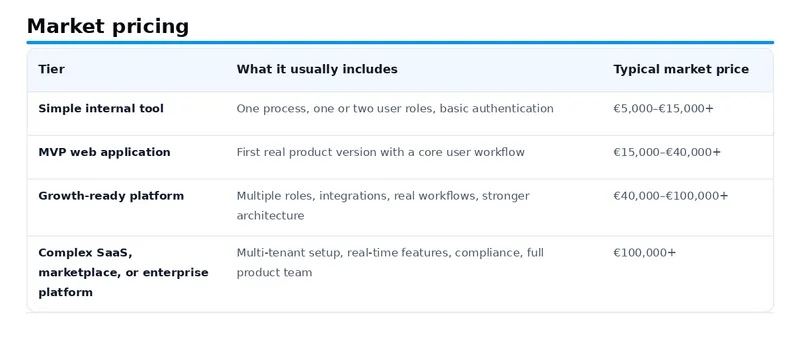
Industry data puts most small-to-mid custom builds in the $30,000 to $100,000 range, with enterprise work regularly above $200,000. Clutch’s 2026 review data lands the average reviewed project around $66,000, roughly €60,000, spread across several months.
Those numbers are real and reflect what a typical US or Western European agency charges, including the overhead of a large multi-role team.
Here is the market, broken into tiers.
Those are the going rates.
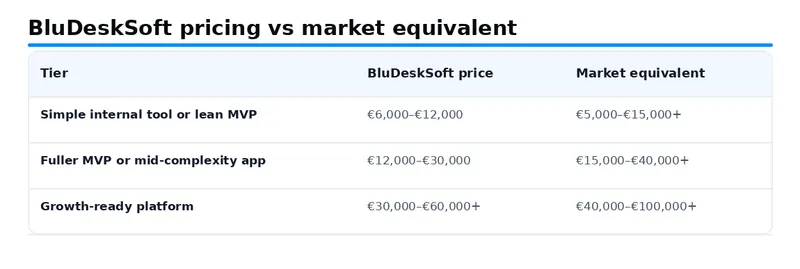
Now here is where we fit.
What We Charge, and Why It Is Less
We are a small senior team on a modern stack: Next.js, Supabase, Payload CMS, PostgreSQL, and Vercel.
We ship in weeks rather than months, we use AI tooling throughout the build, and we are not carrying the overhead of a thirty-person agency.
So we deliver work in the same tiers for meaningfully less.
Most custom web apps we build land between €8,000 and €35,000, and projects start at €6,000.
We do not quote six-figure enterprise platforms, and we will come back to why that is a deliberate choice further down.
This is not a discount or a loss leader. It is what a senior team in our position can charge and still run a healthy business.
You get senior work on a faster timeline, for roughly half what a Western agency charges.
If the lower number makes you nervous, the rest of this article is about exactly what you are paying for, so you can judge it for yourself.
A Worked Example: What €15,000 Buys With Us
Say you run a small services business that needs a client portal.
Customers log in, see their projects, upload files, approve work, and pay an invoice. Your team sees the other side of it and manages everything in one place.
With us, that is a mid-complexity build around €15,000.
The market would call this an MVP and quote you closer to €25,000 or more.
Here is where the money goes.
A week of discovery turns “a client portal” into a concrete plan: the screens, the user roles, the data model, and the two or three integrations you actually need.
You approve it before anyone writes production code, and you get a fixed price for the rest.
The build covers the parts you can see and the parts you cannot.
On the surface:
a clean login;
a customer dashboard;
a file area;
an approvals flow;
an admin side for your team.
Underneath:
secure accounts where the right person sees the right data;
a payment integration;
email notifications;
a database designed to hold up as you add customers.
You watch it come together in weekly demos, so nothing is a surprise at the end.
Then it ships.
You get the live product, the code, and a short handoff. If you want us to keep it updated and monitored, that is a care plan from €200 a month.
Swap the details and the same budget builds a booking system, an internal tool, or the first version of a SaaS product.
What Actually Drives the Cost
Whichever tier you land in, the same variables move the number.
Understanding them is key to controlling your budget.
Scope and Feature Complexity
Scope is the single biggest driver.
A login system is simple.
A login system with roles, team accounts, invitations, billing plans, password recovery, audit logs, and admin controls is not.
A booking form is simple.
A booking system with availability rules, payments, calendar sync, cancellations, and reminders is genuinely complex.
Feature lists mislead because two apps can both have a “dashboard,” yet one shows basic stats and the other requires real-time data, filters, exports, and permissions.
The real question is not how many features.
It is how complex each one is behind the scenes.
UX and Product Design
Good design is not just aesthetics.
For a web application, UX decides how well users understand the product, complete tasks, and avoid mistakes.
Poor UX creates support tickets and low adoption.
For simple tools, the design phase can be lean.
For a SaaS product people use daily, it deserves real investment.
User Roles and Permissions
Apps get more expensive when different users need different access:
admin;
team member;
client;
manager;
vendor;
buyer.
Each role adds logic about what they can see, edit, approve, and delete.
Permissions are routinely underestimated, and they are critical for security and privacy.
Integrations
Connecting to Stripe, a CRM, a calendar, an email service, or an AI API adds work.
Some integrations are simple.
Others need custom logic, webhooks, error handling, and data syncing.
The more your app leans on outside systems, the more there is to build, test, and secure.
This is where cheap builds fail: the interface looks fine at launch, but the logic underneath is fragile and cannot support the next feature without a rewrite.
Security and Testing
Any app handling user data needs:
secure authentication;
role-based access;
input validation;
safe file handling;
backups.
Payments, health data, or financial data raise the bar further.
Testing is the first thing cut from cheap projects and one of the most expensive things to skip, because without it the bugs move from your team to your users.
Technology Stack and Project Management
The right stack helps you launch faster and maintain the product more easily.
We use Next.js, Supabase, and Vercel for exactly that reason.
Strong project management also matters.
Weekly demos, scope control, and clear decisions are what keep a build from drifting.
Good communication does not slow a project down.
It keeps it from quietly going off the rails.
Why Cheap Web Applications Often Become Expensive
A cheap quote is tempting when you are protecting your runway.
But the cheapest quote is rarely the cheapest outcome.
Low-cost builds often skip:
discovery;
UX planning;
clean architecture;
testing;
security.
It looks acceptable at launch, then the problems arrive.
Features break when new ones are added. The database is weak. Performance drops as usage grows. Security gaps surface late. Eventually, another team rebuilds it.
A rebuild almost always costs more than building it properly the first time.
This is not an argument for overspending on version one.
It is an argument for building small but correctly.
A lean MVP is smart.
A fragile MVP is expensive.
We know the pattern because we have inherited enough of these projects to fix them.
How to Reduce Cost Without Hurting Quality
Cut scope, not quality.
Here are four ways to do it.
Start With Discovery
Before any code, get clear on:
who the app is for;
what the first version must do;
what can wait;
which integrations are truly necessary;
what success looks like at 90 days.
A focused discovery prevents vague requirements and expensive changes later.
Build an MVP, Not the Full Vision
Split features into:
must-have;
should-have;
later.
Version one includes only what is needed to validate the product and serve the first users.
Use Existing Tools Where They Fit
Payments, authentication, email, analytics, and file storage rarely need to be custom-built.
Save your custom budget for what actually makes your product different.
Plan for Maintenance From Day One
An app is not finished at launch.
Updates, security patches, monitoring, and iteration are ongoing.
Ignoring them in the budget is not frugal.
It is risky.
How We Price: Fixed, After Discovery
We quote a fixed price for an agreed scope, set during a short paid discovery.
You know the cost before we start, and you are never exposed to an open meter.
We do not bill by the hour.
The trade-off is that the scope has to be clear, which is exactly what discovery is for.
Discovery starts at €1,000, and that fee comes off the build if you go ahead.
If a product is genuinely open-ended and will keep evolving as you learn, we run it as an ongoing monthly engagement instead of a fixed build.
But either way, you always know what you are paying.
The market often defaults to time-and-materials, where you pay for hours and the final cost is unknown until the work is done.
That puts the risk on you.
We would rather carry that risk ourselves, which is the point of pricing a scope up front.
When a Project Is Bigger Than Us
We are honest about where we stop.
Six-figure enterprise platforms, multi-tenant systems with strict compliance, and real-time products at scale often need a full product team:
a strategist;
a dedicated designer;
multiple engineers;
QA;
DevOps;
sometimes a security specialist.
That is not a three-person job, and we will not pretend otherwise.
If your project is genuinely that large, we will tell you on the first call.
Usually, we will help you scope a focused first version that we can build well rather than a full platform we cannot.
Sometimes the smartest spend is a sharp €30,000 version that proves the idea, not a €150,000 one that guesses at everything.
Questions to Ask Before Requesting a Quote
Before any agency can price your project honestly, have clear answers to these:
What problem should the app solve, and who will use it?
How many user roles are needed?
What are the must-have features for version one?
Does it need payments, accounts, or admin tools?
What integrations are required?
What data will it store, and does any of it need special handling?
What is the expected launch timeline and a realistic budget range?
The clearer you are, the more accurate the estimate.
If an agency gives you a fixed price without asking serious questions, be careful.
Real custom software needs context before it can be estimated.
FAQ
How much does it cost to build a web app from scratch?
Across the market, most custom web apps land between €15,000 and €100,000+, with the average reviewed project around $66,000.
With us, most custom apps fall between €8,000 and €35,000, and projects start at €6,000, because we are a senior team on a modern stack without big-agency overhead.
How much does an MVP cost?
On the open market, an MVP usually runs €15,000 to €40,000.
With us, it depends on how lean you keep it.
A focused MVP can start around €6,000 to €12,000, while a fuller MVP with more workflows, payments, and a polished UI runs €12,000 to €30,000.
What is the cheapest way to build a web application?
Start with a focused MVP: only the core features needed to validate the idea.
Use existing tools for payments, authentication, and email rather than building everything custom.
And if your needs are genuinely simple, a WordPress site or an off-the-shelf tool may be a smarter spend.
We will tell you if that is the case.
How long does it take?
Faster than the market norm, because we use a modern stack and AI tooling throughout.
A focused tool takes a few weeks.
An MVP is usually four to eight weeks.
A growth-ready platform runs two to four months.
The market typically quotes two to four months for an MVP alone.
Do you charge by the hour?
No.
After discovery, you get a fixed price for an agreed scope, so you know the cost up front and you are never watching a meter.
What are the ongoing costs after launch?
For a typical app on a modern stack, hosting runs about €50 to €200 a month in the first year, scaling as you grow.
If you want us to handle updates, monitoring, and fixes, care plans start at €200 a month.
You own the code either way, so you are never locked in.
Why do quotes vary so much?
Because “web application” covers everything from a basic admin panel to a multi-tenant SaaS platform.
Quotes also vary by team location, agency overhead, and how much discovery happens before the estimate.
The Bottom Line
The market charges €15,000 to €100,000 and up for custom web applications, and those numbers are real.
We deliver work in the same tiers from €6,000, because of where we are, the stack we use, and how fast we ship.
That is the gap, and now you know why it exists.
For founders, the smart approach is the same at any budget.
Define the problem clearly. Prioritize the core workflow. Build the smallest reliable version. Leave room to improve after launch.
And do not treat the cheapest quote as the safest one, or the most expensive as the most serious.
If you are planning a custom web application and want a realistic view of scope, budget, and options before a line of code is written, we can help you turn the idea into a clear roadmap.
 BluDeskSoft
-6-1600x900.webp)

-800x450.webp)
-800x450.webp)