Website Security Checklist for Small Business Founders
Website security checklist for founders who don't code - what to fix first.
G
Georgiana Nutas
·15 min read
You don't need to understand encryption algorithms to use a practical website security checklist for small business owners. You just need to know what can expose your website, your customers, or your revenue, and what to fix first.
Most website security advice is written for technical teams. It talks about WAFs, CSPs, zero-trust architecture, penetration testing, and threat modeling. All of that has its place. But if you're a founder, product manager, or SMB owner without a technical co-founder, you probably need a simpler answer:
What actually matters this week?
The stakes are real. IBM's latest Cost of a Data Breach Report puts the global average cost of a data breach at $4.4 million. That number does not mean every small business will lose millions after a breach. For SMBs, the more immediate damage is usually more practical: downtime, lost leads, damaged trust, recovery costs, emergency developer work, and weeks of founder attention pulled away from growth.
You don't need enterprise-level defenses from day one. But you do need the basics done properly, in the right order.
A founder launches a website or product. The focus is on speed, customers, content, sales, onboarding, analytics, and revenue. Security gets pushed into the background because it feels invisible. If the site loads, the forms work, and customers can sign up, everything feels fine.
Until it isn't.
For many small businesses, website security is treated as something the hosting provider, CMS, or plugin ecosystem “probably handles.” Sometimes that is partly true. Modern platforms have made security easier than it used to be. Vercel, Netlify, reputable WordPress hosts, managed databases, and cloud services can handle a lot of the heavy lifting.
But they do not handle everything.
Your hosting provider may give you an SSL certificate, but it will not remove a former contractor’s admin access. WordPress may provide core updates, but it will not decide whether the random plugin you installed two years ago is still safe. Your payment provider may secure card processing, but it will not protect a poorly configured contact form or database table.
Security is not one switch you turn on.
G
Written by
Georgiana Nutas
Building modern web applications at BluDeskSoft. We write about what we learn along the way.
and whether your technical setup follows basic security standards.
The good news is that most of the highest-impact actions do not require you to write code.
The Checklist, Ordered by What Actually Matters First
1. HTTPS on every single page — not just checkout
If your website still shows “Not Secure” in the browser address bar, fix that first.
HTTPS encrypts the connection between your visitor’s browser and your website. That matters for contact forms, login pages, admin panels, newsletter forms, blog pages, landing pages, and any page where trust matters.
In the past, some websites only used HTTPS for checkout or login pages. In 2026, that is not enough. Visitors expect the entire website to be secure. Browsers visibly warn users when a site is not using HTTPS, and Google has confirmed HTTPS as a lightweight ranking signal. It is not a magic SEO boost, but it is part of the baseline for a trustworthy website.
Most modern hosting platforms issue and renew SSL/TLS certificates automatically. If yours does not, that is worth questioning. Security basics should not require a manual fire drill every few months.
What to check:
Open your website in a browser and visit:
your homepage,
your blog,
your contact page,
your landing pages,
your login page,
and any form or checkout flow.
Does every page load with https:// and a secure connection?
Also check for mixed content. This happens when your page uses HTTPS, but some images, scripts, fonts, or embedded resources still load over insecure HTTP. It can create warnings and weaken trust.
Founder-friendly action: ask your developer or hosting provider to confirm that HTTPS is forced globally and that all HTTP versions redirect properly to HTTPS.
2. Passwords and access — the most common way in
Most website incidents do not start with a genius hacker breaking through advanced defenses.
They often start with something much simpler:
a reused password,
a shared admin account,
a former freelancer who still has access,
a weak hosting login,
or an email inbox that controls password resets.
This is one of the cheapest security problems to fix, and one of the easiest to ignore.
Start with three rules.
One login per person. Never share one admin account across the team, your agency, your VA, and your freelancer. Shared logins create confusion. If something breaks, you do not know who changed what. If someone leaves, you have to change the password for everyone.
Turn on multi-factor authentication. MFA should be enabled on every account connected to your website:
CMS,
hosting provider,
domain registrar,
email account,
analytics tools,
database dashboard,
payment provider,
and project management tools that contain credentials.
CISA describes MFA as a simple and effective step that can block many common cyberattacks and reduce the risk of account compromise. For a small business, this is one of the highest-impact changes you can make in under an hour.
Remove access immediately when someone leaves. This includes employees, contractors, agencies, developers, interns, and marketing freelancers. A former contractor’s still-active login is not harmless. It is an open door.
Founder-friendly action: create a simple access list of everyone who can access your website, hosting, domain, CMS, analytics, and email tools. Review it once per month.
3. Keep your software updated — especially if you're on WordPress
If your site runs on WordPress, this part is non-negotiable.
WordPress itself is not “insecure” by default. The bigger issue is the ecosystem around it: themes, plugins, builders, abandoned add-ons, outdated integrations, and poor maintenance habits.
A WordPress site with ten carefully chosen, updated plugins can be secure. A WordPress site with forty plugins, half of them outdated, is a different story.
OWASP consistently highlights issues such as security misconfiguration, vulnerable components, broken access control, and outdated dependencies as among the most critical web application risks. In plain English: many real-world problems come from known issues that were already fixable, but never fixed.
What to update:
WordPress core,
themes,
plugins,
PHP version,
server packages,
CMS integrations,
and any third-party scripts you rely on.
What to delete:
unused plugins,
inactive themes,
old staging copies,
abandoned landing page builders,
duplicate form plugins,
outdated tracking scripts,
and test accounts.
A deactivated plugin sitting on your server is not always neutral. If the files are still there and vulnerable, they may still create risk. If you do not use it, remove it.
Practical rule: update stable releases within a week. If the site is business-critical, test updates on staging first.
Founder-friendly action: ask for a monthly maintenance report that lists what was updated, what was removed, and what still needs attention.
4. Backups you've actually tested
A backup you have never restored is not a backup.
It is a theory.
Many founders assume their website is backed up because their hosting dashboard says “daily backups.” That is a good start, but it is not enough. The real question is: can you restore the site quickly if something goes wrong?
A useful backup setup should answer five questions:
How often are backups created?
Where are they stored?
Are they separate from the live server?
How long are they retained?
Has anyone tested a restore?
Daily backups are ideal for most business websites. If your website changes constantly — ecommerce orders, bookings, user accounts, SaaS data — you may need more frequent backups or database-level recovery options.
Also, backups should not live only on the same server as your website. If the server is compromised, deleted, or corrupted, your backup may disappear with it.
The FTC recommends regular backups as part of basic small business cybersecurity. That is because recovery is not just a technical concern. It is a business continuity concern.
Founder-friendly action: ask your developer or host to perform one restore test on a staging environment. You do not need to do it yourself. You just need proof that it works.
5. Protect your domain and DNS access
This is the security step many founders forget.
Your domain is one of your most valuable digital assets. If someone gains access to your domain registrar or DNS settings, they may be able to:
redirect your website,
intercept email,
break your app,
point visitors to a fake site,
or lock you out of your own domain.
This can happen even if your website code is perfectly secure.
Your domain registrar is where your domain is managed. DNS is what tells the internet where your website, email, and services live. As a non-technical founder, you do not need to understand every DNS record. But you should know who controls them.
What to check:
Is MFA enabled on your domain registrar account?
Is domain lock enabled?
Is auto-renew turned on?
Is the recovery email current?
Who has access to DNS settings?
Are old agency or freelancer accounts removed?
Is the domain registered under your business, not a former developer’s personal account?
That last point matters. Your domain should never be owned by a freelancer, an agency, an employee, or a friend. They can manage it for you, but the business should own it.
Founder-friendly action: log in to your registrar and confirm that the domain owner, billing email, recovery email, MFA, and auto-renew settings are correct.
6. Basic security headers, if you're on custom code
If your website runs on a custom-built stack rather than a CMS, ask your developer whether basic security headers are configured.
You do not need to set them yourself. You just need to know they exist and ask the right question.
The most common ones include:
HTTP Strict Transport Security (HSTS) This tells browsers to always use HTTPS when visiting your website. It helps prevent downgrade attacks where a user is pushed onto an insecure connection.
Content Security Policy (CSP) This controls which scripts, styles, fonts, images, and external resources are allowed to run on your website. A strong CSP can reduce the impact of cross-site scripting attacks.
X-Frame-Options or frame-ancestors This prevents your website from being embedded inside a malicious frame on another domain. It helps protect against clickjacking.
Referrer-Policy This controls how much information your site sends to other websites when someone clicks a link.
Permissions-Policy This limits access to browser features such as the camera, microphone, geolocation, and payment APIs.
These are not glamorous features. Visitors will not notice them. But they are part of a mature technical setup.
Founder-friendly action: send your developer this question: “Can you confirm we have basic security headers configured, including HSTS, CSP, frame-protection, Referrer-Policy, and Permissions-Policy?”
7. Know where customer data actually lives
If your website collects personal data, you need a clear answer to one question:
Where does that data go?
This includes:
contact form submissions,
newsletter signups,
account registrations,
booking requests,
payment metadata,
uploaded files,
support tickets,
CRM entries,
analytics identifiers,
and customer messages.
Many small businesses collect more data than they realize. A contact form might send submissions to email, store them in WordPress, push them to a CRM, and trigger an automation in another tool. That means the same customer data may exist in four places.
From a security and privacy perspective, that matters.
You should know:
where data is stored,
who can access it,
whether it is encrypted,
how long it is retained,
how it can be deleted,
and whether third-party tools are involved.
If you operate in the EU or serve EU customers, GDPR also matters. You do not need to panic, but you do need to handle data responsibly. The simplest principle is this: collect only what you need, store it only where necessary, and limit access to people who genuinely need it.
Managed tools can help. Stripe handles payment security. Supabase can enforce row-level security. Reputable form and CRM tools offer access controls. But “the platform supports it” is not the same as “we configured it correctly.”
Founder-friendly action: map your customer data flow in plain language. Example: “Contact form → email inbox → HubSpot → monthly export.” Then review who has access to each step.
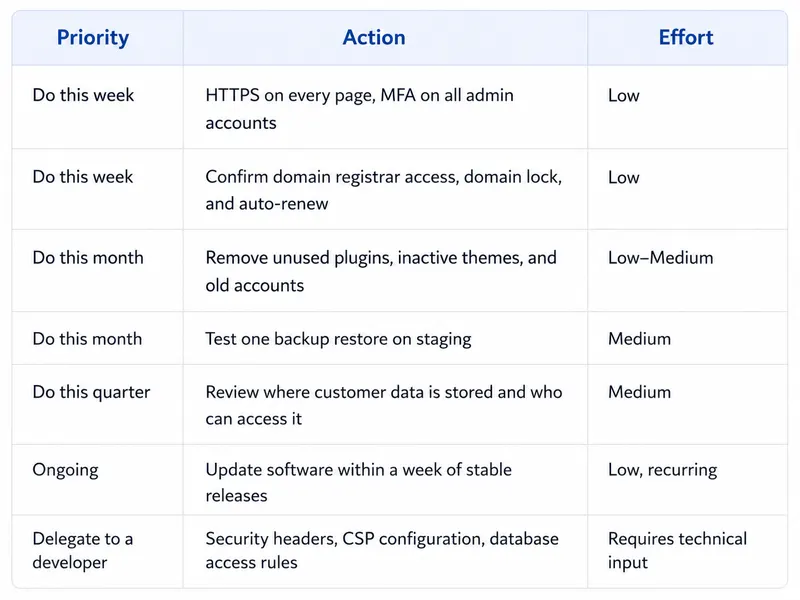
A Quick Way to Prioritize
Not everything on this checklist needs to happen this week. If you have limited time and no dedicated security budget, prioritize by risk and effort.
The goal is not to become paranoid. The goal is to remove obvious risks before they become expensive distractions.
What This Looks Like in Practice
When we rebuilt the BluDeskSoft website, moving from WordPress on shared hosting to a custom Next.js, Payload CMS, Supabase, and Vercel stack, we did not treat security as a separate final step.
It was part of the architecture from the beginning.
That meant:
fewer third-party plugins,
fewer moving parts to maintain,
server-only credentials that never reach the browser,
database access rules configured deliberately,
managed hosting with automatic HTTPS,
and a clearer separation between public pages, CMS access, and backend services.
That does not mean every small business needs a custom stack. WordPress can still be the right choice for many websites, especially when speed, budget, and editorial control matter.
But the platform should match the business.
A simple brochure website, a high-traffic content site, an ecommerce store, and a SaaS product do not have the same risk profile. A founder collecting leads through a five-page website needs a different level of security than a founder storing user accounts, billing data, and private customer files.
The important thing is not to overbuild. It is to make conscious decisions.
If you are running WordPress, maintain it properly. If you are running custom code, configure the basics properly. If you are collecting customer data, know where it lives. If your website drives revenue, treat it like infrastructure — not a one-time design project.
Frequently Asked Questions
Do I need a security consultant if I'm a small business?
Not usually, at least not at the beginning.
Most of what protects a small business website — HTTPS, MFA, updates, backups, access control, and basic monitoring — does not require a specialist security consultant. It requires discipline and someone responsible for maintenance.
A consultant becomes more relevant if:
you handle sensitive customer data,
you operate in a regulated industry,
you process large volumes of transactions,
you are preparing for enterprise customers,
you have already had an incident,
or your product has complex user permissions.
For most early-stage founders and SMBs, a reliable developer or maintenance partner is the right first step.
Is WordPress less secure than a custom-built website?
Not inherently.
WordPress is popular, which makes it a bigger target. But popularity does not automatically mean poor security. A well-maintained WordPress site with quality hosting, minimal plugins, MFA, backups, and regular updates can be secure.
The problem is a neglected WordPress.
Too many plugins, outdated themes, abandoned builders, cheap hosting, shared admin accounts, and no maintenance process create risk quickly.
A custom-built website is not automatically safer either. Poor custom code, weak database rules, exposed credentials, missing security headers, or bad deployment practices can create serious vulnerabilities.
The platform matters. Maintenance matters more.
How much does a website security breach actually cost a small business?
The answer depends on the type of incident.
For a small business, the highest cost is often not a global average breach number. It is the practical fallout:
your website goes offline,
leads stop coming in,
customers lose trust,
your team loses time,
emergency fixes cost more,
your domain or email reputation is damaged,
and the founder gets pulled into recovery instead of growth.
Even a “small” incident can create weeks of disruption.
That is why basic prevention is worth it. Not because every business is facing an enterprise-level attack, but because the simple fixes are cheaper than emergency recovery.
What's the single highest-impact thing I can do today?
Turn on multi-factor authentication for every important login connected to your website.
Start with:
domain registrar,
hosting provider,
CMS admin,
business email,
payment provider,
database dashboard,
analytics,
and password manager.
This is the fastest way to reduce the risk of account takeover.
How often should I review website security?
For most small businesses, a monthly review is enough.
That review should include:
plugin and software updates,
user access,
backups,
uptime alerts,
form functionality,
domain renewal status,
and any unusual activity.
If your website is a SaaS product, an e-commerce platform, or a high-traffic lead-generation engine, you may need more frequent monitoring.
What should I ask my developer or agency?
Ask simple, direct questions:
Is HTTPS forced across the whole site?
Is MFA enabled for all admin tools?
Who has access to the CMS, hosting, domain, and database?
Are unused plugins, accounts, and themes removed?
Are backups automated and tested?
Where is customer data stored?
Are security headers configured?
Are credentials kept out of the frontend code?
What happens if the site goes down?
A good technical partner should be able to answer these questions clearly without resorting to jargon.
Where to Go From Here
Website security is not a one-time checkbox you can check. It is a maintenance habit.
The good news is that most small business website security is not about advanced hacking scenarios. It is about getting the basics right:
secure connections,
strong access control,
regular updates,
tested backups,
protected domain settings,
clean data handling,
and a technical setup that does not rely on luck.
Founders are busy. Security will rarely feel as urgent as sales, hiring, product, or customer support. But a neglected website can quietly become a business risk.
If you would rather have someone review your setup, handle updates, monitor issues, and keep the boring-but-critical parts under control, BluDeskSoft can help with ongoing website maintenance and support.
A secure website does not need to be complicated.
It just needs to be maintained.
Builder, WordPress or custom? What a website really costs before launch and every year after.
 BluDeskSoft
-1-1600x900.webp)