Next.js 16 + Payload CMS + Supabase: How We Built Our Agency Website
We rebuilt our agency site from scratch. Here's the full stack, real code, and before/after PageSpeed scores.
G
Georgiana Nutas
·15 min read
We build websites for clients. Our own site ran on WordPress with Elementor on shared hosting.
That contradiction lived rent-free in our heads for years. BluDeskSoft is a web development agency. We have shipped a digital loyalty platform for local businesses, an SEO linting tool that runs 60+ automated checks in 30 seconds, and a multi-tenant optometry CRM with real-time dashboards. But our own online presence? A WordPress template with zero Open Graph tags, duplicate H1S, missing canonical URLs, and a blog page whose title literally read "Copy."
We finally rebuilt it from scratch. This post walks through the architecture, the code, the tradeoffs, and the real performance numbers -- including full before-and-after PageSpeed data for every page. No fluff, no sponsored opinions. Just what we built and why.
Why We Chose This Stack
We evaluated five frameworks and four CMS options before settling on anything. The requirements were specific:
- Server-rendered pages with strong SEO defaults out of the box
- A content management layer for blog posts only (not for marketing pages)
- A database we could also use for contact forms and newsletter signups
- A component library we own and can modify without fighting a framework
- Deployment with preview URLs on every pull request
We considered Astro, Remix, and SvelteKit. Astro was tempting for a mostly-static site, but we wanted React Server Components for blog post rendering and the ability to add interactive features later without re-architecting. Remix had strong data-loading patterns but lacked the static-generation story we needed for the 71 migrated blog posts. SvelteKit would have meant retraining the team on a new paradigm for a project that needed to ship fast.
Next.js 16 with the App Router gave us RSC, built-in image optimization, ISR for blog content, and a deployment target (Vercel) that removes infrastructure management entirely.
For the CMS, we looked at Sanity, Strapi, and Contentful alongside Payload. The deciding factor: Payload 3.x embeds directly inside a Next.js application. One repository, one deployment, one build pipeline. No separate CMS server to maintain. For a small agency, operational simplicity matters more than feature checklists.
For the database, Supabase gave us managed Postgres with row-level security, a dashboard for non-technical team members to inspect data, and client libraries for server-side inserts. We needed a place to store contact form submissions and newsletter signups outside of Payload's content domain.
Tagged:#WebDevelopment #NextJS #AgencyLife
G
Written by
Georgiana Nutas
Building modern web applications at BluDeskSoft. We write about what we learn along the way.
The rest: Tailwind v4 for utility-first CSS, shadcn/ui for accessible component primitives we can modify directly, and Resend for transactional email with a clean API.
The Architecture
Next.js 16 is the application framework. It handles routing, rendering, and deployment. The App Router uses the (app) route group for the public site and the (payload) route group for the admin panel.
Payload CMS 3.x runs inside the same Next.js process. It manages blog posts, categories, media uploads, and user authentication for the admin panel. It stores its data in Supabase Postgres using a dedicated schema.
Supabase provides the Postgres database. It handles two concerns: Payload's content storage (in the "payload" schema) and application data like contact form submissions and newsletter signups (in the "public" schema).
Resend handles outbound email. When someone submits the contact form, a server action inserts the data into Supabase and then sends a notification email to our team plus a confirmation email to the visitor.
Vercel hosts the application. Every push to main triggers a production deploy. Every pull request gets a preview URL.
One detail worth emphasizing: Payload is used exclusively for blog posts. Services, projects, team members, FAQs, testimonials, navigation, and site configuration are all hardcoded in TypeScript data files under src/data/. If content rarely changes and doesn't need non-developer editing, it doesn't need a CMS. This keeps the codebase simple and the build predictable.
Setting Up Payload CMS with Supabase Postgres
The most important architectural decision in our Payload setup was schema separation. Payload uses Drizzle ORM under the hood, and running `drizzle push` will synchronize the database schema with the ORM definitions. The problem: if Payload's tables live in the public schema alongside Supabase-managed tables, Drizzle will see the Supabase tables (which have row-level security policies) and attempt to strip them during synchronization.
The fix is straightforward. Tell Payload to use its own schema:
// src/payload.config.ts
import { postgresAdapter } from '@payloadcms/db-postgres';
import { lexicalEditor } from '@payloadcms/richtext-lexical';
import { s3Storage } from '@payloadcms/storage-s3';
import path from 'path';
import { buildConfig } from 'payload';
import { fileURLToPath } from 'url';
import sharp from 'sharp';
import { Users } from './collections/Users';
import { Media } from './collections/Media';
import { BlogPosts } from './collections/BlogPosts';
import { Categories } from './collections/Categories';
The key line is `schemaName: 'payload'` in the postgres adapter configuration. With this, Payload creates all its tables (blog_posts, categories, media, users, and their relationship tables) inside the "payload" schema. Supabase's auth, storage, and our custom application tables stay untouched in the public schema. Drizzle push only affects what it owns.
We also set `defaultDepth: 0` and `maxDepth: 2` to keep API responses lean. By default, Payload doesn't populate relationships unless explicitly requested. This prevents accidental N+1 queries when fetching blog post lists.
A few things to notice. The afterChange and afterDelete hooks call `revalidateTag('blog-posts')` to bust the ISR cache whenever content changes in the admin panel. The dynamic import of `next/cache` is wrapped in a try/catch because these hooks also fire during migration scripts that run outside the Next.js runtime. The slug field auto-generates from the title using a beforeValidate hook, but editors can override it manually.
We also include seoTitle and seoDescription fields so editors can override the auto-generated metadata per post without touching code.
Building the Frontend with Next.js 16 App Router
The project structure follows the App Router convention with route groups:
Every blog post page gets proper metadata: a title, description, canonical URL, and Open Graph tags. This is generated at the framework level using Next.js's metadata API, so there is no chance of forgetting it or having inconsistent implementations across pages. The old WordPress site had zero OG tags on any page and was missing canonical URLs on roughly 80% of pages. Those problems are structurally impossible now.
The blog post content renders using Payload's Lexical rich text renderer as a React Server Component. We dynamically import it and customize the heading converter to inject IDs for the table of contents:
<RichText
data={post.content}
converters={({ defaultConverters }) => ({
...defaultConverters,
heading: ({ node, nodesToJSX }) => {
const children = nodesToJSX({ nodes: node.children });
const Tag = node.tag;
const text = extractTextFromLexical(node);
const id = slugify(text);
return <Tag id={id} key={id}>{children}</Tag>;
},
})}
/>
This gives us anchor links for every heading in a blog post, powering the sticky table of contents sidebar, without any client-side JavaScript for the content itself.
Tailwind v4 + shadcn/ui Design System
Our design system is intentionally constrained. The primary brand color is #347DFE. We use Inter for body text and Geist for code blocks. Neutrals come from Tailwind's slate scale. No dark mode in v1.
That last decision was deliberate. Dark mode doubles the surface area for visual testing. Every component, every section, every gradient, and border needs two versions. For a site rebuild that needed to ship, we chose polish over breadth. Dark mode can come later, done properly, rather than shipped half-baked alongside the initial launch.
We use these shadcn/ui components: Button, Card, Badge, Input, Textarea, Select, Dialog, Sheet, Accordion, and Toast. Each one was installed with the shadcn CLI and then customized. Because shadcn copies the component source code into your project (under src/components/ui/), we own every line. When we needed the Badge component to support an "outline" variant for blog tags, we added it directly. No pull requests to an upstream library, no waiting for a release.
Tailwind v4 simplified our configuration. CSS-first configuration replaced the JavaScript config file. Design tokens live in CSS custom properties. The utility classes we use most are layout utilities (flex, grid, max-w-7xl, px-6), typography (text-sm, font-semibold, tracking-tight), and color (text-slate-900, bg-primary-50, text-primary-600).
Contact Form: Supabase + Resend Integration
The contact form flow demonstrates how Supabase and Resend work together outside of Payload's domain. The form collects name, email, service interest, budget range, and message. Submission is handled by a server action:
error: 'Something went wrong. Please try again or email us directly at contact@bludesksoft.com.',
};
}
// Send emails (don't block on failures)
const emailData = {
name: name.trim(),
email: email.trim(),
phone: null,
service: service || null,
budget: budget || null,
message: message.trim(),
};
await Promise.allSettled([
sendContactNotification(emailData),
sendContactConfirmation(emailData),
]);
return { success: true, error: null };
} catch (error) {
console.error('Contact form error:', error);
return {
success: false,
error: 'Something went wrong. Please try again or email us directly at contact@bludesksoft.com.',
};
}
}
Three things to notice here.
First, the database insert is the source of truth. If it fails, the user gets an error. Email is secondary. This means we never lose a lead, even if Resend is down.
Second, emails use `Promise.allSettled` rather than `Promise.all`. We send two emails: a notification to our team and a confirmation to the visitor. If one fails, the other still sends. Neither failure affects the user's success response, because the data is already safely in Supabase.
Third, this is a server action. The form component calls it directly. No API route, no fetch call, no endpoint to secure separately. The 'use server' directive means this code only runs on the server. The client never sees the Supabase credentials or the Resend API key.
Performance Results
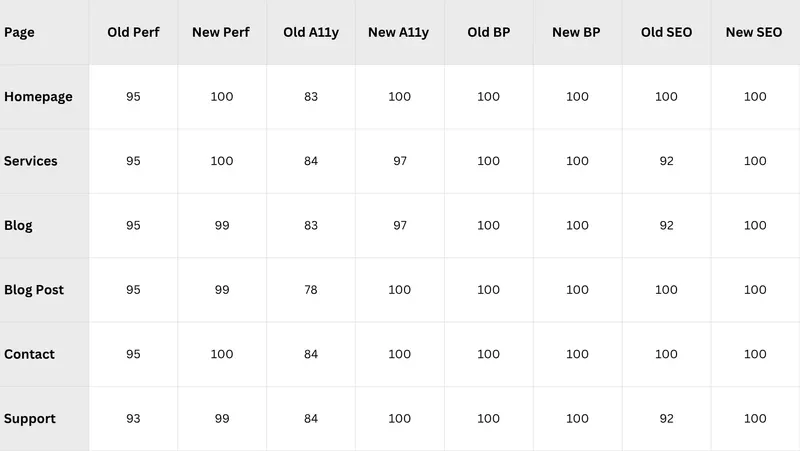
Here is the full before-and-after PageSpeed data. Old refers to the WordPress/Elementor site on shared hosting. New refers to the Next.js site on Vercel.
Desktop scores:
Mobile scores:
The headline numbers: mobile performance averaged 79 on the old site and 97 on the new one, a 23% improvement. Accessibility averaged 81 and jumped to 99, a 21% improvement. The biggest single gain was the blog post page on mobile: 68 to 97, a 43% jump.
Desktop performance was already strong on the old site (93-95 range), so the gains there are incremental. The real story is mobile and accessibility. WordPress with Elementor loaded heavy JavaScript bundles and rendered large DOM trees, crushing mobile scores. React Server Components changed that equation entirely -- static content ships zero client-side JavaScript. The accessibility gains came from semantic HTML throughout, proper heading hierarchies (one H1 per page), and shadcn/ui components that follow WAI-ARIA patterns by default.
Beyond PageSpeed, we fixed structural SEO issues that no performance score captures:
- Added Open Graph tags to every page (the old site had zero)
- Added canonical URLs to every page (roughly 80% were missing)
- Fixed the blog page title that read "Copy" instead of the actual title
- Eliminated duplicate H1 headings on the contact page
- Added meta descriptions to project and support pages
- Fixed the Organization structured data @id that pointed to /en/web-development/ instead of the site root
- Eliminated the broken bilingual setup by shipping English-only with proper content, rather than maintaining stale Romanian translations
What We'd Do Differently
No project ships without regrets. Here are ours.
We should have set up end-to-end tests from the start. We had unit tests for utility functions and manual QA, but no Playwright tests catching regressions in the contact form flow or blog post rendering. We added them later, but "later" meant we shipped a bug in the newsletter signup form that went unnoticed for two days.
The WordPress blog migration script was written hastily. It handled the 71 posts, but the HTML-to-Lexical conversion lost some formatting in edge cases (e.g., nested lists inside blockquotes). A more methodical approach with a diff-check step would have saved time on manual cleanup.
We underestimated how much time it would take to customize the Payload admin panel. The default admin UI is functional, but we wanted custom dashboard widgets and a streamlined editor experience. That work expanded beyond our initial estimate. If you are considering Payload, budget extra time for admin polish.
Finally, we should have documented the Supabase schema separation pattern before writing a single line of application code. We discovered the RLS-stripping issue mid-development when a routine Drizzle push silently wiped every row-level security policy on our contact_submissions table. We recovered from a backup, but the lesson was expensive: when combining Payload with Supabase, configure schemaName before you create any public-schema tables. Not after. Before.
Wrapping Up
The stack: Next.js 16 with the App Router, Payload CMS 3.x embedded in the same deployment, Supabase Postgres with schema separation, Tailwind v4 with shadcn/ui components, Resend for transactional email, Vercel for hosting.
The results: perfect or near-perfect PageSpeed scores across every page, proper SEO metadata everywhere, accessible markup throughout, and a codebase that a single developer can reason about without context-switching between services.
If you are considering a similar migration for your agency or business site, the approach we found most valuable was restraint. Use the CMS only where you need it. Hardcode what rarely changes. Skip features (dark mode, i18n) until you can do them properly. Ship something focused and polished rather than ambitious and incomplete.
We are documenting this entire rebuild publicly. Next in the series: how we audited the old site's SEO, the WordPress-to-Payload blog migration process, and what running Payload CMS in production looks like after three months.
If you are working through a similar migration or weighing these same technology choices, we would genuinely like to hear about it. Reach out at bludesksoft.com/contact—we answer every message.
Paper, spreadsheets, and a booking app that didn't fit. One custom CRM replaced all three.
 BluDeskSoft

-800x450.webp)
-3-800x451.webp)