 BluDeskSoft
Supabase vs Firebase: Which Backend for Your Web App?
Supabase or Firebase? How to pick the right backend for your app.
Georgiana Nutas
Every web app needs a backend: a place to store data, log users in, keep files, and enforce who can see what. Ten years ago, that meant months of custom server work. Today, two platforms let you skip most of it: Supabase and Firebase.
Both promise the same thing: a ready-made backend, so you can put your budget into the product your users actually see. Both are good. But they are built on very different ideas, and picking the wrong one can mean painful workarounds, surprise bills, or a costly rebuild two years later.
We build on Supabase every day at BluDeskSoft: client CRMs, internal tools, our own SEO tool, and our own website. So we will be upfront about where we stand. We will also be honest about where Firebase is the better choice, because sometimes it is.
This Supabase vs Firebase comparison covers what matters when you choose a backend for a business web app: the database, pricing, security, lock-in, and the projects each one fits best.
The short answer
- Choose Supabase if your app manages business data with relationships, such as clients, orders, appointments and invoices, or if you need reports, multi-company access or predictable costs.
- Choose Firebase if you are building a mobile-first app that must work offline, your data is simple, or your team already lives in the Google ecosystem.
Most business web apps we see fall into the first group. Most offline-first mobile apps fall into the second.
What Supabase and Firebase actually are
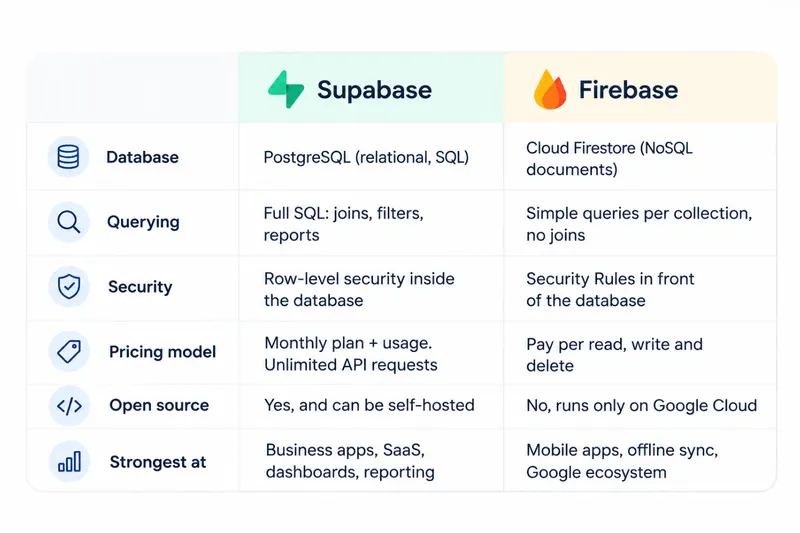
Firebase is Google's backend-as-a-service. It launched years before Supabase and became the default choice for mobile apps. Its main database, Cloud Firestore, stores data as documents grouped in collections, a bit like folders of JSON files. Around it, Google offers authentication, file storage, hosting, cloud functions, push notifications, analytics, and crash reporting.
Supabase describes itself as an open-source alternative to Firebase. It offers a similar set of tools: authentication, storage, real-time updates, edge functions, and scheduled jobs. The big difference is underneath. Every Supabase project is a full PostgreSQL database, an open-source relational database that has run serious production systems for decades.
That single difference, documents versus tables, shapes almost everything else in this comparison.
1. The database: Postgres vs NoSQL
This is the decision that matters most, and the one people think about least.
Business data is relational by nature. A client has many orders. An order has many products. An invoice belongs to a client and to an order. An appointment links a patient, a doctor, and a clinic.
In Supabase, you model this as tables connected to each other. Asking "show me every unpaid invoice from clients in Lyon, with their last order" is one SQL query. Reports, exports, and dashboards come naturally, because SQL was built for exactly that.
Firestore has no joins. To answer the same question, you either store the same data in several places (and keep every copy in sync yourself), or run several queries and stitch the results together in your app code. For simple data, that is fine. As the app grows, it becomes the place where bugs hide.
Firestore shines when data really is document-shaped and read in one piece: a chat message, a user profile, a game state, a product page.
Firebase has noticed the gap. It now offers a Postgres option through Data Connect, backed by Google Cloud SQL. It is a welcome addition, but it is a separate product next to Firestore, not the core of the platform the way Postgres is for Supabase.
Our experience: when we design a backend, the data model comes first, and we get client approval before building a single screen. For almost every business app we have built, that model has been relational. That is the main reason we work with Supabase.
2. Security: row-level security vs Security Rules
Both platforms let your app talk to the database directly from the browser, which is what makes them fast to build with. That also means the backend must enforce security, not just hide it in the app.
Firebase uses Security Rules: a separate rules file that sits in front of Firestore and decides which requests are allowed.
Supabase uses PostgreSQL's row-level security (RLS). The rules live inside the database, attached to each table. Every query, from any source, has to pass them. The database holds the boundary, not just your app code.
This matters most in multi-tenant apps, where several companies share one system and must never see each other's data.
Our experience: we built a multi-tenant CRM for optometry practices, with patient management, appointment booking, and clinical charts. Every practice sees only its own data, enforced by row-level security in Supabase. It is running in production. With patient data involved, we wanted that boundary in the database itself, where a bug in the app code cannot bypass it.
Neither approach is secure by default. Badly written Security Rules or RLS policies both leak data. But SQL-based policies are easier to read, test, and review, which matters when the data is sensitive. We go deeper on this in Is Supabase Good for Production? Security, Scaling, and Costs Explained.
3. Supabase pricing vs Firebase pricing
Both platforms have a free tier generous enough to build and test a real app. The difference is how the bill grows once you have users.
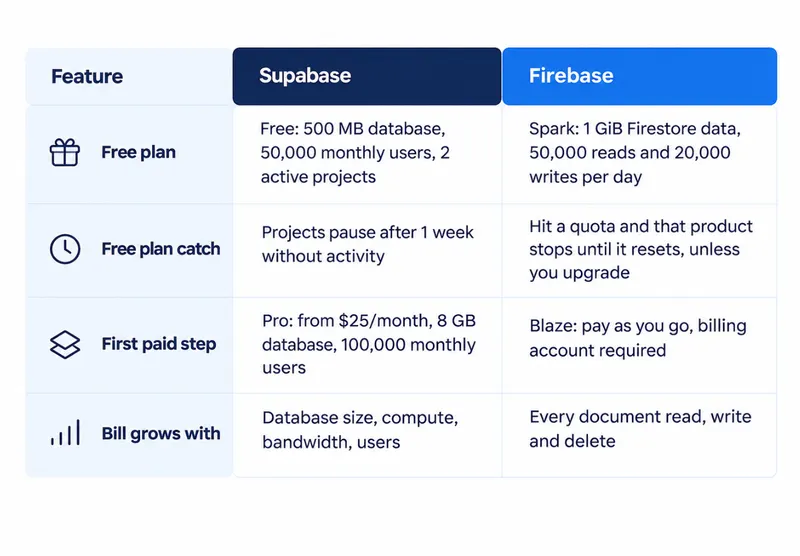
Supabase charges a monthly plan per organization, plus usage beyond what the plan includes: database size, compute, bandwidth, and monthly active users. Supabase pricing page.
Firebase is free up to daily quotas, then pay-as-you-go on the Blaze plan, where you are billed for each document read, write, and delete, plus storage and bandwidth. The Firebase pricing page lists every quota. Eligible new accounts can also get Google Cloud credits when they upgrade to Blaze.
What this means in practice: Firebase is often cheaper for tiny or irregular apps, because you pay almost nothing when nobody uses them. But per-read billing is harder to predict. A dashboard that refreshes often, or a real-time listener on a large collection, can multiply reads quickly, and the bill follows. Supabase is easier to budget: you know the base price, and usage grows with things you can see, like database size.
One practical warning for the Supabase free plan: projects pause after a week of inactivity. That is fine for prototypes, but never run a client's live app on it.
4. Vendor lock-in and data ownership
This is the question founders rarely ask at the start, and wish they had asked later.
Supabase is open source. Your data sits in a standard PostgreSQL database that you can export at any time and run anywhere: on another host, on your own servers, or with Supabase's self-hosted version. If you ever leave, your data and most of your logic come with you.
Firebase is proprietary and runs only on Google Cloud. Firestore's data model and query style are unique to Firebase. Leaving is possible, but it usually means redesigning the database and rewriting the parts of the app that talk to it.
For a weekend side project, lock-in barely matters. For a business that plans to run its software for years, it matters a lot. When we deliver a project, the client owns the code and the database. With Supabase, that ownership is real, not just on paper.
5. Real-time, offline and mobile
Here, Firebase has a genuine advantage.
Both platforms offer real-time updates: when data changes, connected users see it instantly. Supabase does this by streaming changes from the Postgres database. Firebase does it natively through Firestore listeners. For dashboards, notifications, and live status updates, both work well.
Offline support is where Firebase leads. Its mobile SDKs cache data on the device, let users keep working without a connection, and sync changes when they come back online. If you are building a field app for technicians, drivers, or inspectors in areas with patchy coverage, that is a big deal. With Supabase, offline sync is possible, but it takes extra work.
Firebase also bundles mobile tools that Supabase does not try to replace: push notifications, crash reporting, app analytics, and A/B testing.
6. Developer experience and speed to launch
Both platforms let a small team ship fast. That is the whole point of a backend-as-a-service.
Firebase is very quick to start with for simple apps and has a huge community, years of tutorials and deep integration with Google tools.
Supabase gives you a full Postgres database with a clean dashboard, automatic APIs, and auth, storage and functions in one place. Because it is SQL, any experienced developer can read and maintain it, and the skills transfer to any other Postgres project.
Our experience: Supabase gives us a production-ready backend out of the box, so our clients' budgets go into the product their users see, not into backend plumbing. That is a large part of how we ship in weeks rather than months. We use it for client projects and our own products too: our pre-launch SEO tool, LintPage, runs 60 automated checks in about 30 seconds, with Supabase handling accounts and scan history. Our own agency website runs on Next.js, Payload CMS, and Supabase.
When neither is the right answer
A backend-as-a-service is not always the best fit. Projects with unusual requirements, such as heavy background processing or very non-standard data models, can be better served by a custom backend. We tell clients which camp their project falls into during discovery, before we build anything.
Which one should you choose?
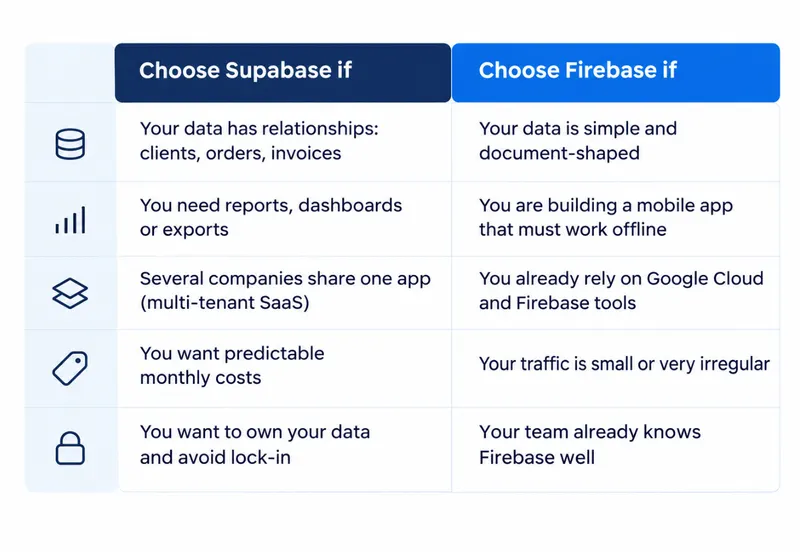
If most of your answers sit on the left, Supabase is very likely the right backend for your web app. That covers most of what we build: multi-tenant SaaS platforms, CRMs and internal tools, customer portals and dashboards, and booking and scheduling systems.
Need a hand choosing or building?
We design the Postgres schema, set up authentication and row-level security, and build the real-time features, storage, edge functions, and scheduled jobs around them. Every project starts with a short discovery, then a data model you approve, then weekly sprints with live demos. After launch, we respond in under one business day.
See how we work on our Supabase development page, then book a free strategy call. We will tell you honestly whether Supabase, Firebase, or a custom backend fits your project.
Frequently asked questions
Is Supabase better than Firebase?
Neither is better for everything. Supabase is usually the stronger choice for business web apps with related data, reporting needs, and multi-company access. Firebase is often better for offline-first mobile apps and teams already invested in Google Cloud.
Is Supabase a good Firebase alternative?
Yes. Supabase is the best-known open-source Firebase alternative, offering authentication, storage, real-time updates, and functions on top of a PostgreSQL database instead of a NoSQL one.
Is Supabase cheaper than Firebase?
It depends on how your app is used. Firebase can cost less for very small or irregular apps. Supabase is usually easier to predict as you grow, because API requests are unlimited and you pay a fixed plan plus usage you can see, instead of paying per document read.
Can I migrate from Firebase to Supabase?
Yes, but it takes planning. Firestore documents have to be reshaped into relational tables, users moved to the new authentication, and the parts of the app that query the database rewritten. Starting on the right backend is cheaper than switching later.
Is Supabase ready for production?
Yes. Supabase runs on PostgreSQL, a database trusted in production for decades, and we run client apps on it in production today. As with any platform, you need to set up security policies, backups, and the right plan properly.
Which is better for a mobile app?
Firebase is better if the app must work offline or relies on push notifications, crash reporting, and app analytics. Supabase also works well for mobile apps, especially when they share a database with a web app or admin dashboard.
Written by
Georgiana Nutas
Building modern web applications at BluDeskSoft. We write about what we learn along the way.