A new website should bring you more customers, not fewer. Yet many businesses launch a beautiful redesign and watch their Google traffic drop the following week. The phone rings less, contact forms go quiet, and nobody knows why.
The cause is almost never the new design. It is what happened to the old pages: URLs that changed without redirects, content that disappeared, or a setting left switched on from the test site.
The good news: a website redesign without losing SEO is entirely possible. It just takes a plan before launch, not a rescue after. This website migration checklist walks you through that plan in three stages: before, during, and after launch.
Why redesigns lose rankings
Google ranks pages, not websites. Over the years, each of your pages has built up signals: links from other sites, a history of clicks, a place in search results for certain keywords.
When a redesign changes a page’s address, and nothing tells Google where it went, those signals have nowhere to go. Google finds a dead page, drops it, and your new page starts from zero.
Not every redesign carries the same risk. It depends on what you change:
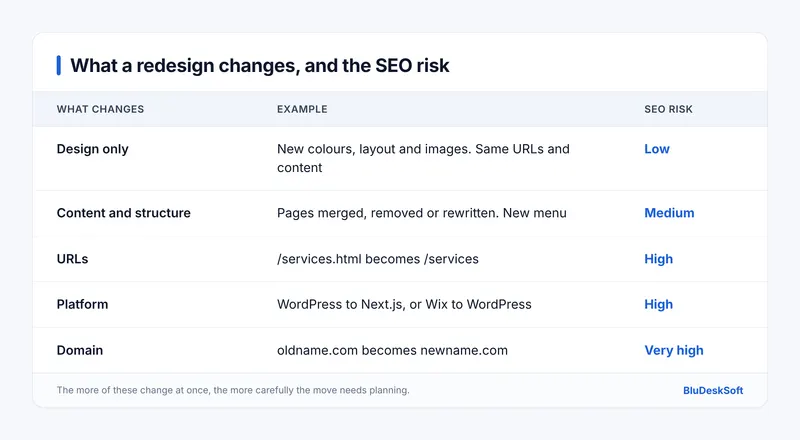
If you are only refreshing colors and images, you can relax. If you are changing platform, structure, and URLs at the same time, which is common, every step below matters.
Not sure a redesign is worth it yet? Start with How Do You Know If It’s Time for a Website Redesign?
Before launch: protect what already works
You cannot tell if a migration went well without knowing where you started. Before you touch anything, record:
- Your top 20 pages by organic traffic, from Google Analytics
- The keywords you rank for and your positions, from Google Search Console
- Monthly organic visits and leads (form sends, calls)
- Your current page speed and Core Web Vitals
Export it all to a spreadsheet and date it. This is the yardstick you will measure the new site against.
2. Crawl and list every URL on the old site
You need a complete inventory of the pages that exist today, including the ones you forgot about: old blog posts, PDF files, landing pages from past campaigns.
A crawler such as Screaming Frog SEO Spider lists every URL it can reach. Add the pages from your XML sitemap and from Search Console, since some pages get traffic without being linked anywhere.
3. Decide what happens to each page
Go through the list and give every URL one of three outcomes:
- Keep: the page moves to the new site, with the same or a new address.
- Merge: several thin pages become one stronger page.
- Remove: the page is outdated and has no traffic or links worth keeping.
Be careful with “remove”. A page that looks unimportant to you may be the one bringing in steady visits from Google. Check your baseline before deleting anything.
4. Build a redirect map
This is the single most important step of any SEO migration. A redirect map is a simple table: every old URL on the left, its new home on the right.
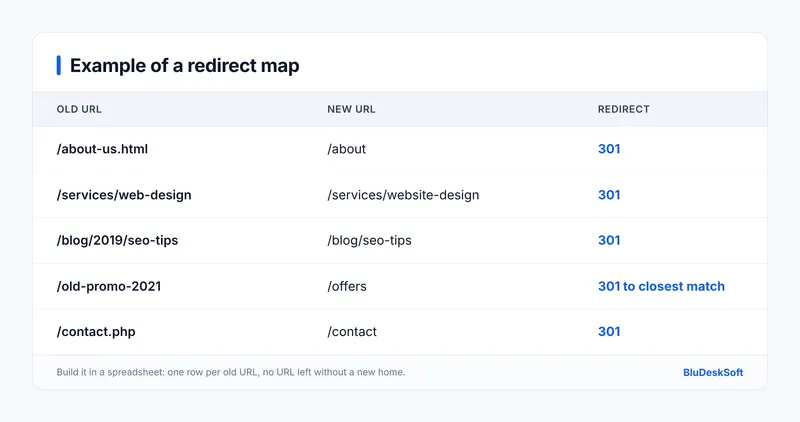
Three rules make it work:
- Use permanent 301 redirects. Google’s own guide on redirects and Google Search recommends a permanent server-side redirect whenever possible. A 301 tells Google the page has moved for good and that the new URL should be shown in search results. Temporary 302 redirects keep the old URL as the one Google shows.
- Redirect to the closest match, not the homepage. Sending every removed page to the homepage confuses visitors and Google alike. Point each one to the most relevant page you have.
- Avoid chains. Old URL → new URL should be one step, never old → older → new.
5. Keep your best content and on-page SEO
A fresh design is a good time to improve content, but don't throw away what ranks. For your top pages, carry over the page titles, meta descriptions, headings, and main body text. Then improve them instead of starting from a blank page.
Also keep your internal links in mind. Pages that were well linked on the old site should stay well linked on the new one.
6. Test on a staging site that Google cannot see
Build and test the new site on a separate staging address, protected by a password or a noindex tag. Before launch, check that:
- Every redirect in your map works
- No page returns a 404 error
- Titles, descriptions and headings are in place
- The site loads fast on mobile
- Forms, calls to action, and tracking all work
Our Pre-Launch Technical SEO Checklist covers the technical checks in detail, and our website security checklist covers the rest.
Launch day: switch carefully
Launch during a quiet period, never on a Friday afternoon or before your busiest season. Then work through this list in the first hours:
- Remove the staging protection. The most common launch mistake is leaving a
noindex tag or a “discourage search engines” setting switched on. Your site will quietly vanish from Google. - Test the redirects live. Check a sample of old URLs, starting with your top 20 pages.
- Submit the new XML sitemap in Google Search Console.
- Check robots.txt to make sure it does not block important pages.
- Changing domain? Use the Change of Address tool in Search Console. It is only for moves from one domain to another. If you keep the same domain, the redirects and an updated sitemap are enough.
After launch: monitor and fix
Expect some movement in rankings in the first weeks while Google recrawls the site. What matters is that the trend recovers. Compare everything against the baseline you saved:
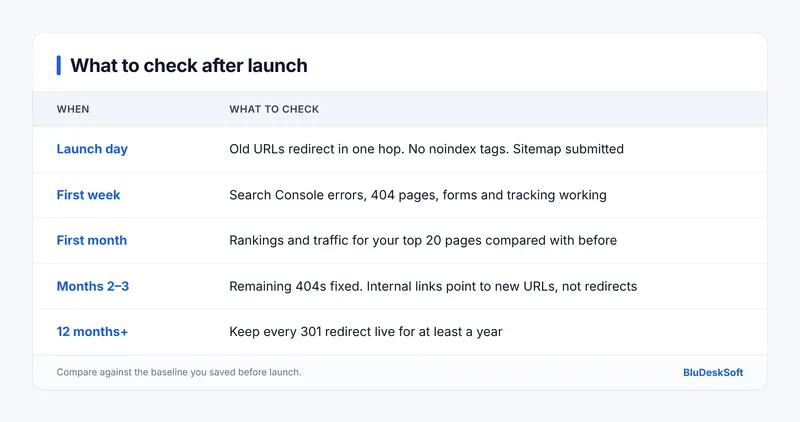
That last row matters more than it looks. Google’s John Mueller has recommended keeping redirects in place for at least one year, because Google needs to see a redirect several times before it treats the move as permanent. Removing them early can undo all the work above. Keeping them longer does no harm.
The 6 most common redesign mistakes
- Launching without a redirect map
- Redirecting every old page to the homepage
- Leaving
noindex on after launch - Deleting pages that brought in traffic
- Changing URLs that did not need to change
- Removing redirects a few months later to “clean up”
Each one is avoidable, and each one is expensive to fix once rankings have dropped.
What we learned migrating our own site
We moved the BluDeskSoft website from WordPress to Next.js, so this checklist is not theory for us. We cover the full process in How We Migrated Our Agency Website From WordPress to Next.js, including what we would do differently next time.
Planning a redesign?
A migration done right protects years of SEO work. Done wrong, it can cost months of leads.
If you are budgeting for a new site, read How Much Does a Website Cost? first. Need a hand with the migration itself? Our WordPress development team handles redesigns and rescues, and our custom web application development service covers moves to a modern stack. Book a free strategy call, and we will tell you exactly what your migration needs.
Frequently asked questions
Will a website redesign hurt my SEO?
Not if you plan it. Rankings drop when pages disappear or change address without 301 redirects. With a redirect map, preserved content, and post-launch checks, a redesign can improve your rankings.
How long does it take to recover rankings after a migration?
Some movement in the first weeks is normal while Google recrawls the site. A well-planned migration usually settles once Google has processed the redirects. If traffic keeps falling, check for broken redirects and 404 errors first.
Should I keep the same URLs when I redesign?
Yes, whenever you can. Keeping your URLs is the safest option, because nothing needs to be redirected. Only change them when the new structure is clearly better.
How long should I keep 301 redirects?
At least one year, and longer is fine. Google needs time to see each redirect several times before it treats the move as permanent.
Only if you move to a new domain. For a redesign on the same domain, 301 redirects and an updated sitemap are enough.
 BluDeskSoft


-800x450.webp)