When Your Excel Spreadsheet Should Become a Web App
Five copies of the same file? Broken formulas? Your spreadsheet may be ready to become a web app.
G
Georgiana Nutas
·8 min read
Almost every business runs on a spreadsheet somewhere. Client lists, orders, stock, quotes, schedules, budgets: it usually starts in Excel, because Excel is fast, flexible, and already on everyone’s computer.
And for a while, that works well. Then the business grows. More people open the file, more tabs appear, more formulas pile up. One day someone saves over the wrong version, a formula breaks, and nobody can say which number is right.
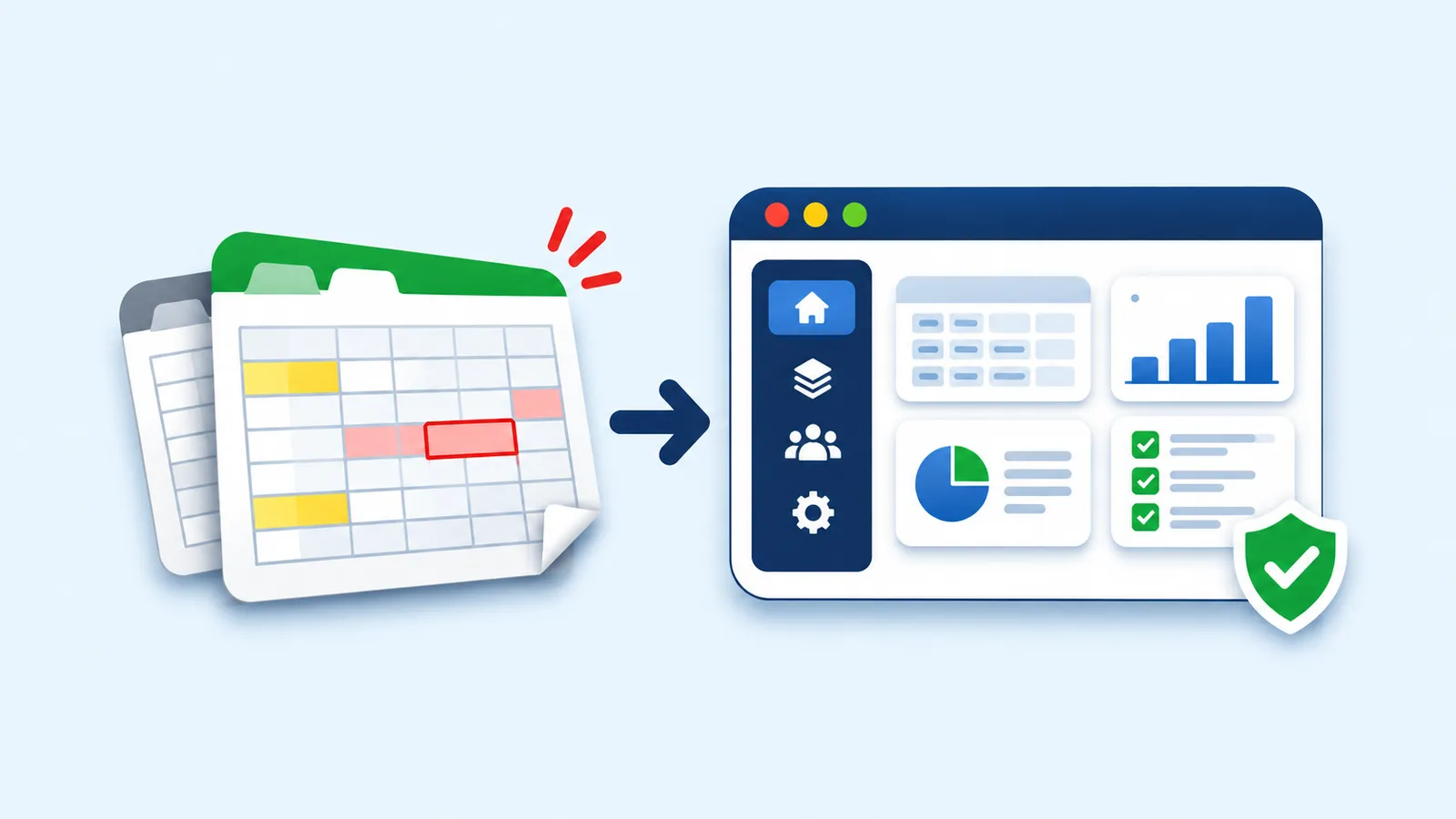
That is usually the moment a spreadsheet has done its job and is ready to become something else: a web app. This guide shows the 8 signs that you have reached that point, when Excel is still the right tool, and how to move from Excel to a web app without losing your data or your team.
Excel is not the problem
To be fair to Excel: it is one of the best tools ever made for working with numbers. It is perfect for building a model, testing an idea, or analyzing data on your own.
The trouble starts when a spreadsheet stops being a tool and becomes a system: the place where your whole team records and runs a daily process. Excel wasn't designed for that job, and the cracks show up in the same places in almost every company.
8 signs your spreadsheet should become a web app
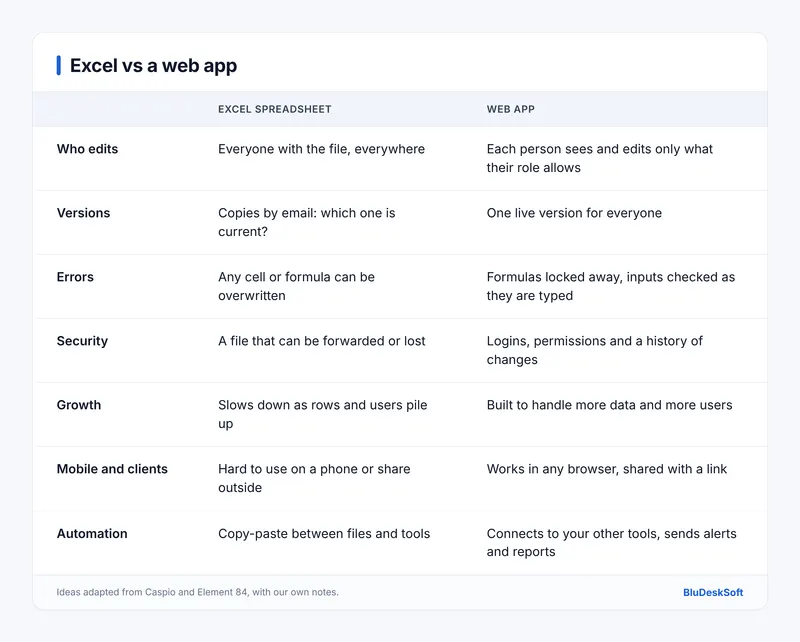
1. There are five versions of the same file
“Clients_FINAL_v3_updated.xlsx” is a warning sign. When several people work on copies sent by email or saved in different folders, nobody knows which one is current. Time goes into merging changes instead of doing the work.
A web app has one version, live for everyone. When someone updates a record, the whole team sees it straight away.
2. One wrong cell can cost you money
In a spreadsheet, every formula is exposed. Anyone can overwrite a cell, drag a formula one row too far, or delete a column without noticing. The errors are often silent: the numbers still look plausible.
A web app keeps the calculations in the code, where users cannot touch them. It checks inputs as they are typed, so a date cannot go in a price field.
3. The file holds sensitive data
Client details, salaries, prices, health or financial data: if it sits in a spreadsheet, it can be copied to a USB stick, forwarded to the wrong person, or left on a lost laptop. Excel’s password protection is easy to bypass, and Office files are a common entry point into a company. Caspio cites Cisco’s 2018 Annual Cybersecurity Report, which found that Microsoft Office formats made up 38% of malicious file extensions in emails.
A web app adds proper logins, gives each person access only to what they need, and keeps a history of who changed what. If you handle personal data in Europe, that also makes GDPR compliance far easier.
4. The file is getting slow
Thousands of rows, dozens of tabs, lookups between files: at some point Excel starts to lag, crash, or take minutes to open. Every extra user makes it worse.
A web app stores data in a real database, built to grow with your business. Ten thousand records or a million, it stays fast.
5. You spend hours copying data around
If someone exports from one tool, pastes into Excel, reformats, then copies the result into another file every week, that is time you pay for, and a chance to make mistakes each time.
A web app can connect directly to your other tools: your accounting software, your online shop, your email. It can send alerts when stock is low, or a weekly report every Monday, without anyone pressing a button.
6. Only one person really understands it
Many business spreadsheets have one author who knows which cells you must never touch. Training a new colleague takes days. When that person is on holiday, the process slows down. When they leave, it may stop.
A web app guides users step by step, with simple forms and clear buttons, so a new person can be productive in an hour. Element 84 makes the same point: a guided interface cuts training time and lets people focus on decisions instead of cells.
7. Your team, or your clients, need it outside the office
Excel on a phone is painful. Sharing a spreadsheet with a client means sending them your whole file, formulas and all.
A web app works in any browser, on any device, and you can share it via a link. You can give clients their own login to check an order or submit a request, without exposing anything else. If you have built a valuable calculation tool, a web app also protects your know-how: users see the results, not your formulas. You could even charge for access.
8. You need reports that update themselves
If preparing the monthly report means a day of pivot tables and copy-paste, the report is out of date the moment it is finished.
A web app can show dashboards with charts that update live, so managers see today’s numbers whenever they want them, not last month’s.
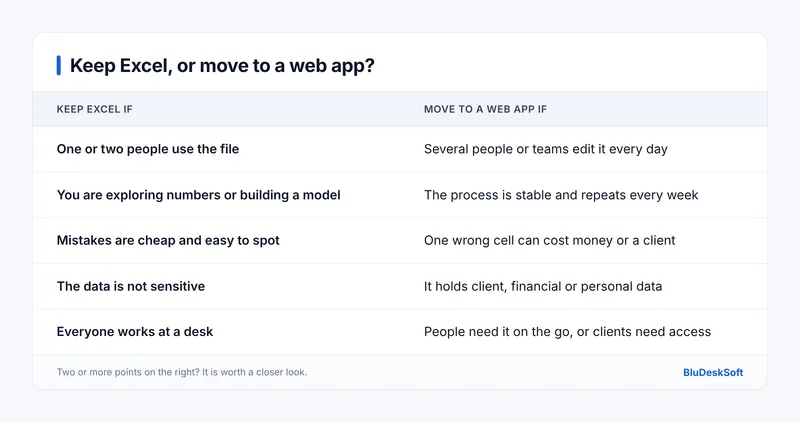
When Excel is still the right choice
Not every spreadsheet should become an app. If you only recognise one sign on the list, Excel is probably fine for now.
There is also a middle step. Shared online spreadsheets and no-code database tools can solve version chaos for small teams at a low monthly cost. They work well until you need custom rules, complex permissions, or connections they do not offer. Then a custom web app takes over. We compare these options in more depth in Custom CRM vs. Off-the-Shelf CRM.
How to move from Excel to a web app
The good news: your spreadsheet is already a detailed specification. It shows what data you track, how you calculate it, and who uses it. That makes the move faster than most people expect.
Map what the spreadsheet does. List every tab, every formula that matters, and every person who uses it. Note what annoys them most.
Clean the data. Remove duplicates, fix inconsistent formats, and decide which old records to keep.
Define who can do what. Who adds records, who approves them, who only reads them.
Start with the core. Build the part your team uses every day first, then add reports and connections. Our guide MVP vs Full Product explains why starting small saves money.
Import your data and run both side by side. Keep the spreadsheet for a few weeks while the team switches over, then retire it.
This is exactly what a discovery phase is for: turning your spreadsheet and your team’s habits into a clear plan and a fixed price before writing any code.
What it costs
A custom web app costs more upfront than a spreadsheet, but it removes the hidden costs of errors, duplicated work, and lost time every week.
At BluDeskSoft, a custom web app build typically falls between €8,000 and €35,000, depending on the number of features, users, and connections. Discovery starts at €1,000 and is credited toward your build if you go ahead. You can see all our ranges on our pricing page, and the full breakdown in How Much Does a Custom Web Application Cost in 2026?
See it in practice
We have helped a business replace paper forms and scattered spreadsheets with a single system. Read the full story in our case study, Custom CRM Development: Replacing Paper and Spreadsheets With One System.
Ready to retire the spreadsheet?
If you ticked three or more of the signs above, your spreadsheet is costing you more than it saves. Send us a short description of what it does, and we will tell you honestly whether it is time for a web app or whether Excel can still do the job.
Yes. Your spreadsheet already shows the data you track, how you calculate it, and who uses it. A developer turns that into a database, forms, and rules, then imports your existing data.
Will I lose my existing data?
No. Your spreadsheet data is cleaned and imported into the new app. Running both side by side for a few weeks makes sure nothing is missed.
Is a web app more secure than Excel?
Usually, yes. A web app adds logins, role-based permissions, and a change history, and keeps data on a server instead of in files that can be copied or forwarded.
How long does it take to replace a spreadsheet with a web app?
It depends on how complex the spreadsheet is. With us, discovery takes 1 to 2 weeks and ends with a clear scope, timeline, and fixed price.
Can my team still export data to Excel?
Yes. Most web apps include an export button, so you can still analyze data in Excel when you need to, without Excel being the system itself.
Compare custom and off-the-shelf CRMs by cost, flexibility, scalability, and business fit.
 BluDeskSoft
-1-800x450.webp)
-800x450.webp)